
How to write a prompt for an AI video editor (and what it will ask you anyway)
Six kinds of video, each with defaults and a short list only you can settle. About one request in four ends in a question; here is how to answer it in the prompt instead.
The best prompt for an AI video editor is shorter than people expect and more specific in one place. It names the kind of video, and then it settles the two or three things that only you can settle. Everything else the editor should already know. This is how Narrative reads a prompt, what it decides on its own, what it will stop and ask you, and how to write the request so it does not have to.
The kind of video does most of the work
Before it cuts anything, Narrative places the request: your words and your footage together name a kind of video, and each kind carries defaults it applies without asking plus a short list of things it will not guess. “A TikTok of me explaining the update” and “cut this interview down” and “a montage of the trip” are three different editors’ worth of defaults, and naming the kind in the first sentence is what switches them on. These are the kinds it knows, what each one does on its own, and what each one asks:
- Talking to camera (UGC, creator). Cuts the gaps tight so the kept stretches butt up with almost no dead air. Captions on, one or two lowercase words at a time under the chin. A product you name gets its shot cut in on the word. Asks: the aspect ratio.
- Podcast or interview, two or more voices. Gaps cut tight, captions on in the podcast style with the word popping on its own beat. Asks: the aspect ratio; the speaker layout (split screen, only whoever is speaking, or a mix); whether B-roll goes over the talking.
- Montage or music edit. The music decides the cut, measured from the track, never a guessed tempo. Asks: whether you have a reference video; if not, which transitions (hard cuts, strobe, mask, whip), the pacing in cuts per second, and how flashy.
- Corporate, launch, product. B-roll always over the talking, captions on at the bottom of the frame, 16:9. Asks: how long the finished edit should run.
- Product demo or screen recording. The product is the hero: cropped to fill the frame, its own sound kept, cut on its events, one line of copy at a time and only copy you gave. Asks: the aspect ratio.
- Family, personal, a dump of photos and clips. No captions. Asks: the style (scrapbook, home movie, and so on), whether to put music under it, and how long.
Something that fits none of these is placed by its nearest neighbours: a wedding film takes the family defaults and the montage’s questions about pace; a tutorial takes the talking-to-camera rules; a highlight reel takes the montage’s. The reply says in one line which kind it took it for, so you can correct it with a word.
Two rules sit over all of them. A first cut carries nothing you did not ask for: no badge, label, counter or watermark, and captions only where the kind says. And anything you have already said, chosen or uploaded beats every default; a question you have already answered is never asked.
What it will ask you anyway
About one request in four ends in a question instead of an edit, and most of those are a single question. On the phone it arrives as a sheet with the choices as buttons; on the web it sits in the chat with the options under it. The editor asks before editing when guessing would change the source, the target or the operation: the first request on a project usually has two or three such things, a follow-up almost never. Whatever is open goes into one ask, then it builds; it does not interrogate you across several turns.
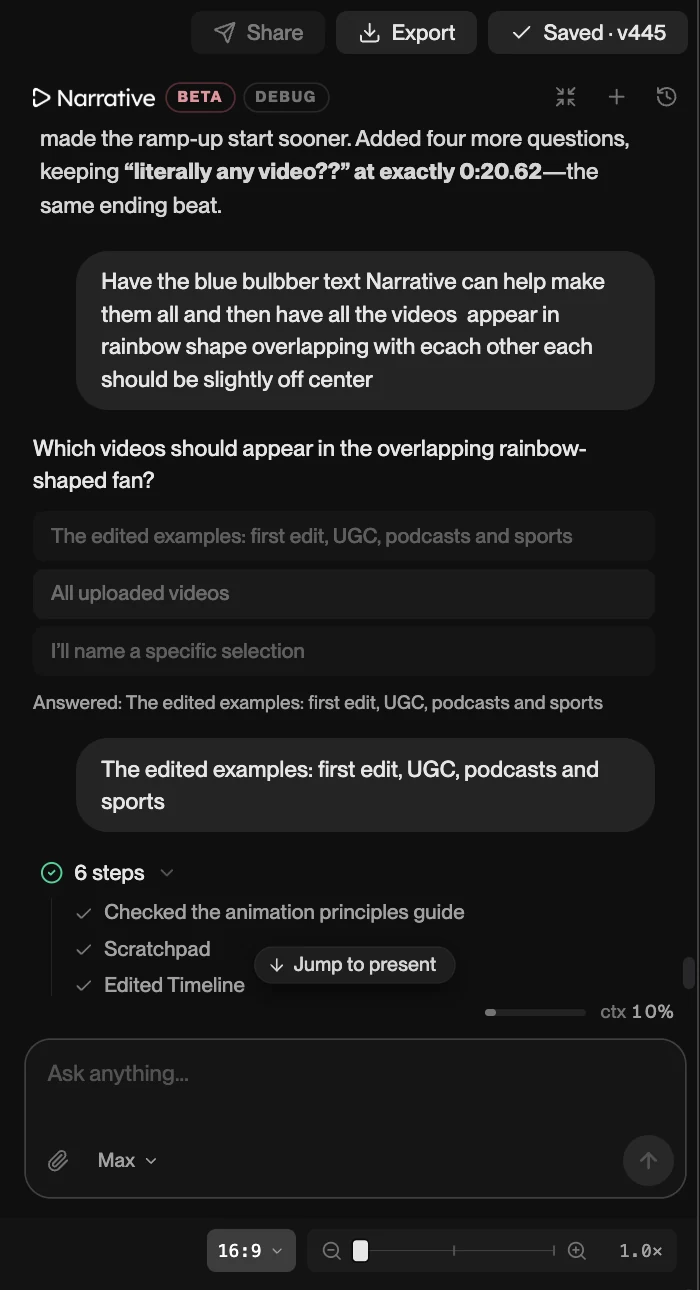
You can skip the question by answering it in the prompt. The list above tells you what each kind will ask, so a prompt that already names the aspect ratio for a talking-head post, or the pace and transitions for a montage, goes straight to the build.
A prompt that skips the question
Four parts, usually one sentence each:
- The kind and the subject. “A product demo of the new export screen.” “A travel montage of the Lisbon clips.”
- The frame and the length. “9:16, about 30 seconds.” “16:9, under two minutes.”
- The things that kind asks. For a montage: “hard cuts on the beat, about two cuts a second, not flashy.” For a podcast: “split screen when they talk over each other, captions on, no B-roll.”
- Anything you own that should be used. “Cut it to the track I added.” “Use the reel I attached as the reference, just its style.” “Keep the shot of the sign.”
A 9:16 TikTok of me talking about the menu, under 20 seconds. Keep it tight, captions on. Cut to the plate shot when I say “the special.”
Montage of the twelve clips from Saturday, 16:9, about a minute, cut to the song I added. Hard cuts on the beat, two or three a second in the chorus, slower in the verses, no effects. The drone shot opens.
Follow-ups: name the moment and the change
After the first cut, a prompt is a correction, and a correction has two parts: where, and what. “The second clip is too long.” “At 0:14 the cut comes a beat early.” “The caption covers her face.” “Lose the freeze on the landing.” You do not need to say how; the editor knows what it built and starts from the version as it is now, including anything you trimmed by hand. Vague follow-ups (“make it better”) produce a different video, not a better one, because nothing in them says what was wrong.
One follow-up that works better than it sounds: “a few frames early” or “a few frames late” moves a cut without you having to find the exact frame.
Things not to bother saying
- How to cut dialogue. Tight is the default for every speech kind.
- Which font for captions. Each kind has one, and the result is consistent across your posts; change it only if you have a brand font.
- The tempo of a song. It is measured, not estimated.
- “Make it look professional.” Every default here already is; say what professional means for this video instead (“no effects, let the plays speak”).
Try one
On a computer, open the podcast clip on its timeline and send one of the suggested requests, or your own; opening it needs no account, and your first change starts a three-day free trial. On a phone, the iPhone app asks its question as a sheet and takes your tap as the answer.