
How to add transitions between clips, and when a hard cut is the better one
A transition covers a cut, and most cuts do not need covering. The five kinds, the one technical constraint, and a high-energy edit that puts its three transitions nowhere near the beat.
Transitions are the first thing a new editor adds and the first thing an experienced one takes out. Both are reacting to the same fact: a transition is a way of covering a cut, and most cuts do not need covering. The skill is knowing which ones do, and what to cover them with.
This is how transitions work in Narrative: the five kinds, the rule for choosing, the one technical constraint that decides what is possible at a given cut, and what happens when you ask for “some transitions” without saying where. The snowboard edit is the example, because it is a high-energy cut with three transitions in it, none of them on the cuts that carry the beat, and that is the lesson.
Hard cut is the default
A hard cut is a transition, the plainest one, and for most footage it is the right one. Two people talking: hard cuts. A montage cut to music: hard cuts on the beat, because the beat is doing the joining. The editor starts from hard cuts and adds something else only when a cut needs it or you ask for it.
A cut needs something when the two shots have nothing in common and the join reads as a mistake: a location change, a jump in time, B-roll arriving over an interview. Those get a soft transition. Energy is a separate question, answered with a different kind.
The five kinds
- Crossfade. One shot dissolves into the next. 0.3 to 0.6 seconds for B-roll and location changes. Longer reads as a memory.
- Dip. Down to black and back up. A chapter break. A dip borrows no footage from either side, which matters below.
- Glitch. A frame or two of digital damage across the cut. Energy, sparingly.
- Whip. A motion blur that throws the frame sideways into the next shot. Energy, and it wants matching motion in the footage.
- Zoom punch. A fast push in on the outgoing frame that lands on the incoming one. The cheapest energy transition, and the one that fits where the others cannot.
The constraint: handles
Every transition except the dip needs footage that is not in the edit. A crossfade between clip A and clip B plays A past its out point while B plays before its in point; the overlap is made of frames you trimmed away. Editors call those frames handles. If clip A ends exactly where its source file ends, there is no handle, and a crossfade there would freeze or stutter.
The editor checks the handle at every cut before choosing. A cut with no room does not get skipped; it gets a transition that fits. The zoom punch needs the least room (about an eighth of a second before the cut and a fifth after), and a dip to black needs none, so one of those goes where the crossfade cannot. The reply tells you which cuts got the fallback and why, so if you would rather trim a clip to make room for the crossfade you wanted, you know where.
How many
“Add some transitions” used to be a taste call, and taste said “sparingly”, so a nine-clip talking-head edit came back with three zoom punches on its last three cuts and five cuts left bare. That was wrong, and it is fixed: an unqualified request for transitions means one on every cut. Nine clips, eight cuts, eight transitions. “Sparingly” now applies to the choice between glitch and crossfade, never to leaving cuts bare once you asked.
If you want fewer, say so: “three transitions” or “a crossfade between the intro and the kitchen shot, nothing else”. The reply always counts what it covered against the total, so you can check it: “8 of 8 cuts: crossfades, a dip at 1:12 where there was no handle.”
What the snowboard edit does instead
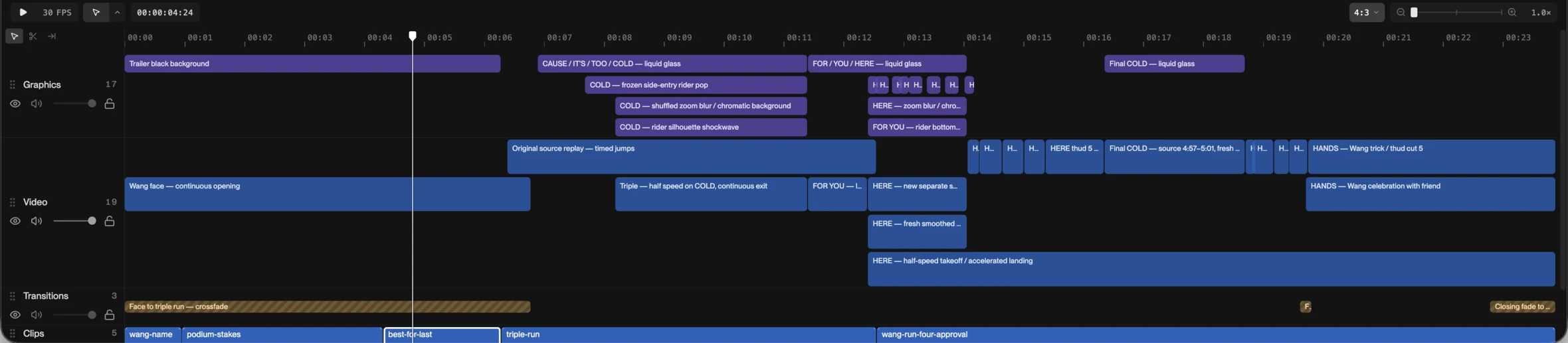
Open it and read the transitions row. Three blocks. A crossfade carries the opening face shot into the triple run, where the piece changes gear. A glitch, a fifth of a second long, joins the final trick to the hug that follows it, the one cut where the footage jumps from the course to the crowd. And a fade to black closes it. Everything else is a hard cut. The glitch treatments you see elsewhere are not on cuts at all; they sit on the jumps themselves, on the airborne frames, the rotation and the landing, as effects over the action. That is the distinction worth taking away: cover the cuts that change gear or change place, put the energy on the moments that have energy in them, and leave the rest clean so the beat can be heard.
The festival recap makes the same point from the other side: twenty cuts in twenty seconds, and its transitions row holds nine blocks, every one of them a black shutter on the drum build. Not a single dissolve. The joins are the beat, and the accents are black frames.
On the timeline
A transition is its own block on its own row, sitting across the cut it covers. You can read its length, and you can see at a glance which cuts have one and which do not. It is anchored to the cut, so if you move or trim the clip the transition moves with it.
How to ask
- “Add transitions between the clips.” One on every cut, the kind chosen per cut.
- “Crossfades on the B-roll, hard cuts on the interview.” The choice made for you, by type of cut.
- “A whip into the drop, glitches on the two jumps, nothing else.” Named cuts, exactly those.
- “Take the transitions out.” Back to hard cuts.
Add transitions between the clips: crossfades where the location changes, a dip before the closing shot, and keep the cuts on the beat clean.
Check it on the real thing
Open the snowboard edit, read the three blocks on the transitions row, then scrub a jump and watch a glitch sit on the action rather than on a cut. Then ask it for “crossfades on every cut” and look at how much the beat disappears. Take them out again; that is one version back. Opening the edit needs no account; the first change starts a free trial.