
How to cut a video to the beat of the music
Cutting on the beat by hand means marking every downbeat. Here it is one request, shown on a 24-second snowboard edit and a 20-second festival recap.
Cutting to the beat by hand is a marker exercise: play the track, tap a marker on every downbeat, then drag each cut onto a marker. It works, and it is the reason a 20-second montage can take an afternoon.
In Narrative the music is analysed for beats, downbeats and accents when it is in the project, and “cut on the beat” is a request. This guide shows what that produces on two real edits, both public, both open on their timelines without an account: a 24-second snowboard edit and a 20-second festival recap.
What “on the beat” means in an edit
Three different things, and a brief should say which:
- Cuts on the beat. Every shot change lands on a beat or a downbeat. This is the montage rhythm.
- A moment on the drop. One event (a title, the biggest trick, the reveal) lands on the one moment in the track everyone is waiting for.
- Accents. A single hit in the music gets a single hit in the picture: a flash, a black frame, a cut.
The snowboard edit does the second; the festival recap does the first and third.
The title on the drop
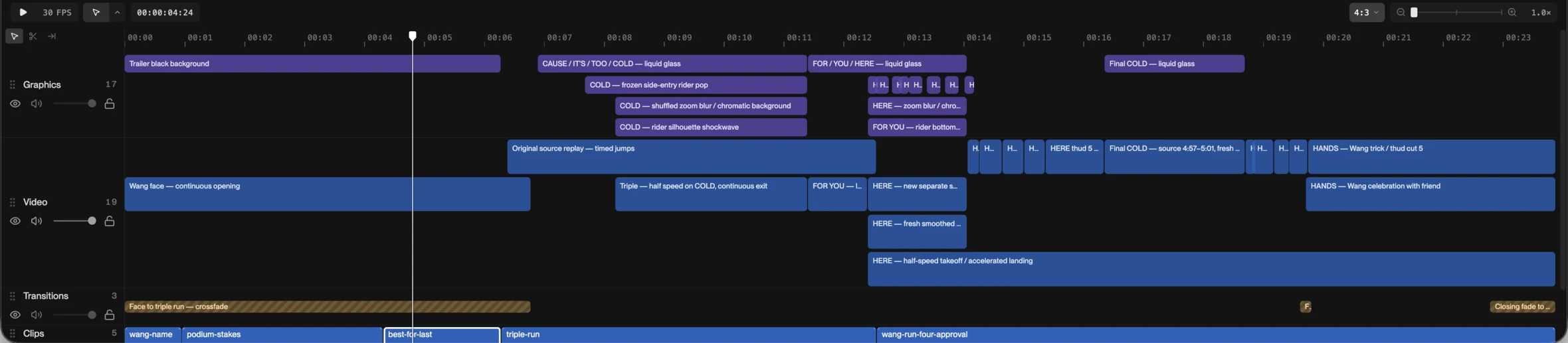
The snowboard edit’s title is four words, CAUSE / IT’S / TOO / COLD, each its own card. They start at 0:06 and COLD lands at 0:11, which is where the track drops. The music underneath is a beat-matched bridge between two pieces, so the tempo under the title is continuous and the drop arrives where the cut needs it. On the timeline, the title is four blocks on the graphics track; the cuts under it are on the video track. Ask for the drop to move and only those blocks move.
Cuts and accents on the build
The festival recap is 20 seconds and twenty cuts. Most of the shots at the front are ordinary length: night lights, the crowd turning to camera, the stage screen in daylight. Then the track builds and the cuts shorten with it: a run of shots, each a tenth to half a second (a friend, the dancing, the DJ, the fans, the tent, a totem, the sunset, the night), on the subdivisions of the beat, into a black-shutter hit on the drum build. That run is the “cuts on the beat” case and the black frames are the accents.
How to ask for it
Name the music, name the moment, name the rhythm.
Cut the montage on the beat. Put the title on the drop, one word per card. On the build, strobe through the best shots on the beat, then black on the last hit.
Three things make this work better:
- Put the track in the project before the request. The beats are read from the file. Describing a song the editor cannot hear does nothing.
- Say which moment is the drop, if it is not obvious. “The drop at 0:48” is unambiguous. Most tracks have one obvious drop; some have three.
- Decide what the cuts are for. A montage that is all downbeats reads as a slideshow. The recap above earns its strobe by holding the first shots longer.
Revising rhythm
Rhythm revisions are small and should be asked for small. “Move the drop one beat later.” “Hold the crowd shot through the build.” “Every second beat, not every beat.” Each is a version; if a change makes it worse, restore the one before. What you are looking for on review is not whether the cuts are on beats (they will be) but whether the pictures on the beats are the right pictures.
When not to cut on the beat
Dialogue. A cut that lands on a beat in the middle of a sentence is a cut in the middle of a sentence. For an interview or a podcast clip the words set the rhythm and the music sits under them. Cutting to the beat is for pictures that do not talk: sport, events, travel, product, anything with a soundtrack instead of a speaker.
See it on a real timeline
Open the snowboard edit and scrub to 0:11. Then open the recap and scrub the strobe run at the end; the cuts are the blocks. Ask either of them for one change to the rhythm and watch which blocks move. Opening it needs no account, your first change starts a three-day free trial, and the web editor runs on a computer; on a phone, the iPhone app is the way in.