
AI video editors vs. traditional editing software: which one for which job
Where an AI editor saves you time, where a traditional NLE still wins, and how to test the difference on one real project instead of a feature list.
A traditional editor gives you precise tools and a blank timeline. An AI editor starts from the outcome you describe and builds the timeline for you. They overlap on what they can produce; they differ on where your time goes and how much of the decision-making you do by hand.
This comparison is written by the people who make one of the AI editors, so read it with that in mind. To keep it honest, every claim about what an AI editor does points at a finished edit you can open on its real timeline, with no account, and judge yourself.
The short answer
| Consideration | AI video editor | Traditional editor (NLE) |
|---|---|---|
| You start from | A description of the finished video | A blank timeline and your source media |
| Best at | Finding the moments, the first cut, and a look-and-music finish from a sentence | Frame-level precision and specialist finishing |
| Learning curve | Low for a first result | High, with far deeper manual control |
| Repetitive work | Several versions or formats from one ask | Presets, templates, and manual steps |
| Predictability | You review decisions you did not make | You make every decision yourself |
| When it fails | Chose the wrong moment or misread intent | Took a long time to get to a reviewable cut |
If your projects are footage-heavy and the finished video is short, AI removes most of the schedule, and the better AI editors now handle the colour and music finish too. If your projects are finish-heavy in the specialist sense, with compositing, a surround mix or a colourist’s pipeline, a traditional editor is still the tool.
How a traditional editor works, and why that is still good
Premiere, Resolve, Final Cut and Avid are built around bins, a viewer, tracks, effects and a timeline. You import, watch, log, set in and out points, assemble, and adjust every transition and layer yourself.
That model is powerful because nothing is hidden. It is the right tool for compositing, detailed sound work, colour pipelines, long-form collaboration with specialists, and any job where a specific frame has to be exactly right and documented.
The cost is time before the shape of the video is visible. Someone has to watch everything, organise it, and assemble it before anyone can react to a cut.
How an AI editor works
You bring the footage and describe the result. The editor reads the footage, picks the moments, lays the cut on the timeline, and tells you what it did. When the brief leaves something open, it asks. Here is a real turn from a project cut in Narrative, a piece of motion graphics for our own homepage video:
Have the blue bubble text “Narrative can help make them all” and then have all the videos appear in a rainbow shape overlapping with each other, each slightly off centre.
It came back with a question first, Which videos should appear in the overlapping rainbow-shaped fan?, and three answers to pick from. Then it built it and listed its steps.
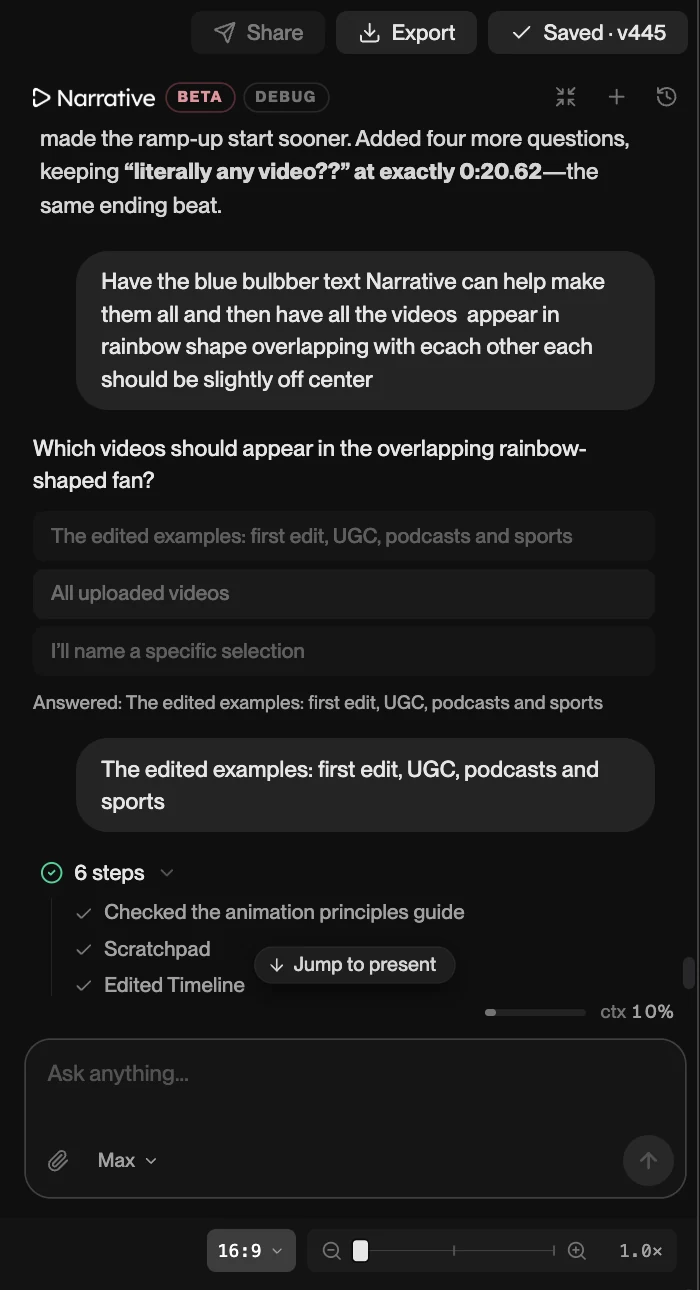
That is a single turn. A finished edit is many of them. The 24-second snowboard edit below, title and beat-cut music included, has a version counter that reads v315. In a traditional editor those would be undo steps you cannot name. Here each one is a version named by the request that made it, tagged with who made it, and one click from being restored.
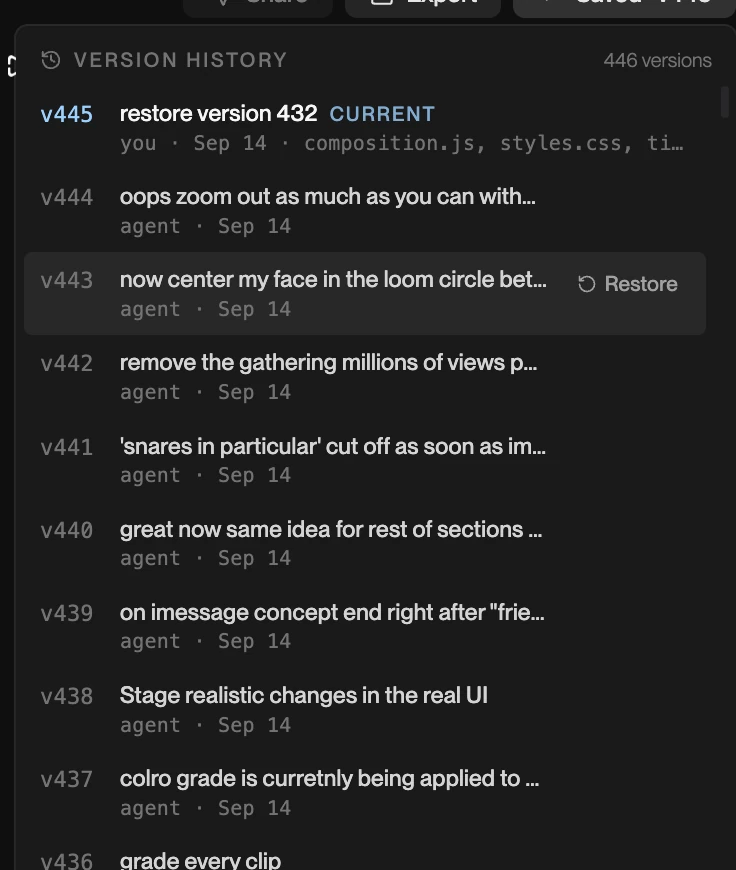
From there you work the way you would with a human editor’s first pass: ask for changes by naming the moment, or step back to an earlier version if a revision went the wrong way. Every turn is saved as a version.
The one question that separates AI editors
Is the output a timeline or a file?
Some AI tools hand you a finished video and nothing else. If the second shot is wrong, you start over or fix it elsewhere. Others give you an editable timeline: the same clips, cuts, titles and music, open for you to change.
This matters more than any other item on a feature list, because the first cut is almost never the last one. An AI editor whose output you cannot open turns “review and revise” into “accept or reject.”
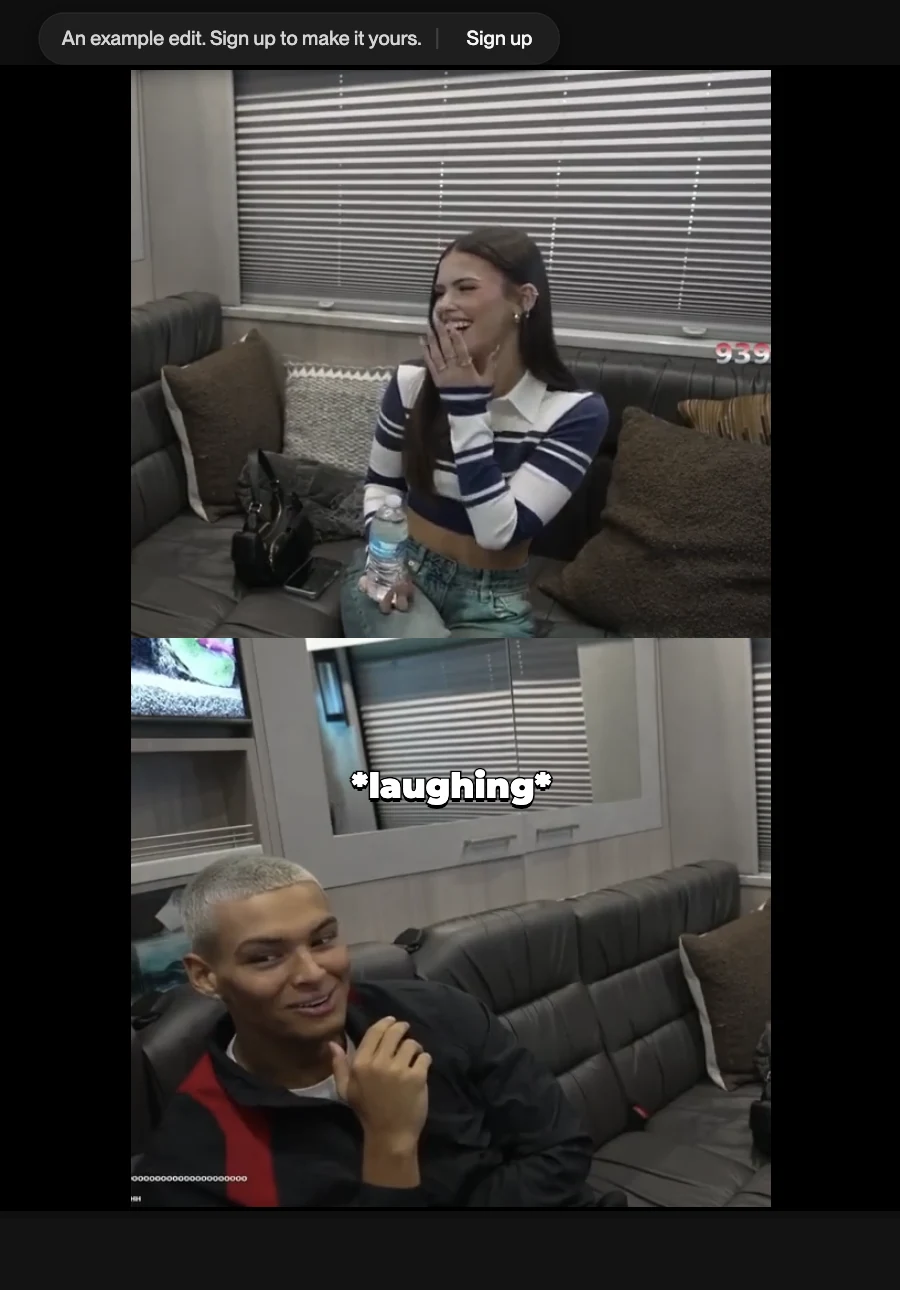
You can check this for yourself rather than take our word for it. This two-minute interview piece, captions and lower-thirds included, was edited in Narrative. Open it and you are looking at its real timeline: scrub it, open the version history, see where the cuts land. Then ask it for a change and watch what moves.
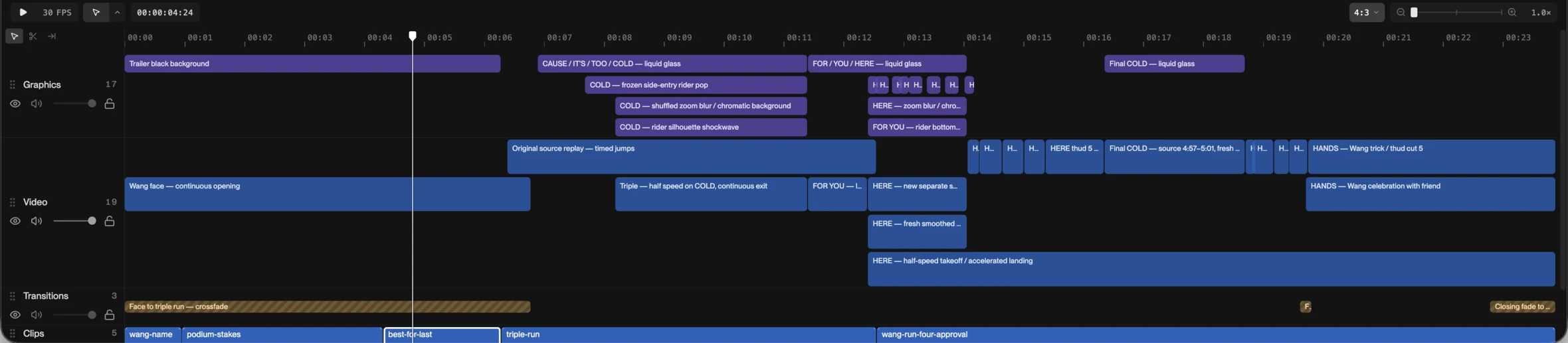
The same is true of the snowboard edit. Its timeline has a graphics track with every title and zoom-blur as its own block, the video cuts under them, a transitions track, and the source clips named at the bottom. Nothing is baked in.
Speed: where AI wins clearly
AI compresses the two slowest stages: reviewing the footage and building the rough assembly. When there are hours of recording and the deliverable is a minute long, finding every usable moment stops being a linear watch-through.
The projects where this shows up most:
- Podcasts and interviews cut into clips. A captioned vertical clip, just over a minute, from a longer conversation.
- Event footage into a recap. Twenty seconds from a festival.
- Sports and action footage into a highlight. The 24-second snowboard edit, with a title and a beat-cut music bed.
- Social cutdowns. A captioned vertical creator clip, under 30 seconds.
- Anything that needs several formats from the same material. Asking for 9:16 after a 16:9 cut is one request, and a two-person conversation comes out with both speakers in the shot, stacked.
Speed does not mean no review. An AI editor can choose the technically clean moment over the human one, or miss context a person would catch. What you get is a reviewable cut much sooner, and the time you save goes into review.
Finishing: the line is moving
The usual claim is that AI editors assemble and traditional editors finish. That was true a year ago and is less true now, so it is worth being specific about where the line sits.
Some AI editors, Narrative among them, now do finishing work that used to require a second tool:
- Colour. A grading panel with colour wheels (lift, gamma, gain, offset), curves, an RGB parade and LUTs, applied to one clip or the whole cut. You can ask for the look in chat (“grade every clip” is a real request from the version history above) or open the panel and grade by hand.
- Sound and rhythm. The music is analysed for beats, downbeats and accents, so “cut the montage on the beat” lands cuts where the drums land rather than approximately near them. Sound effects get their own track; the creator clip has a Vine boom on one. The music bed sits under the cut and the title runs where you said.
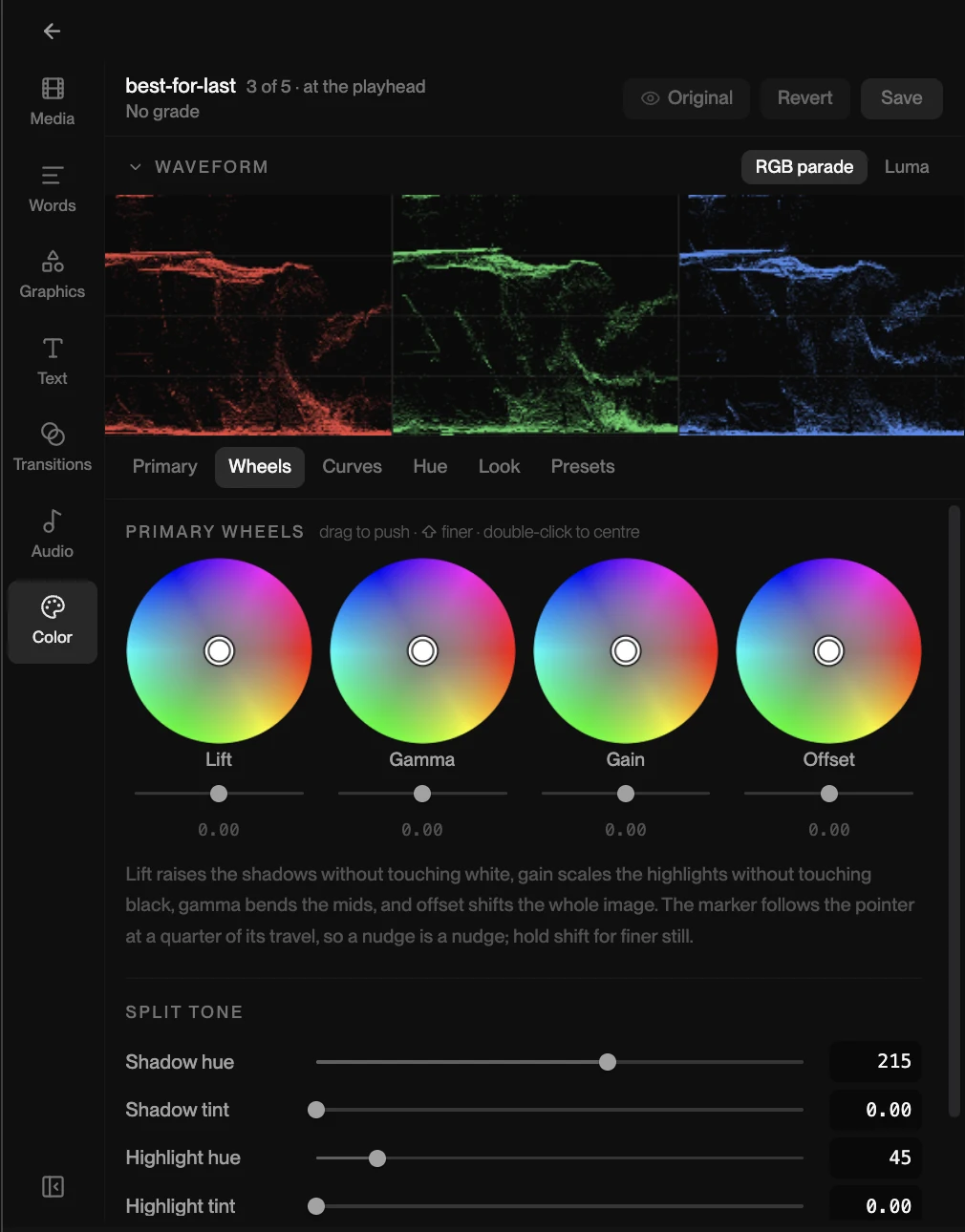
This is what makes an AI-edited highlight feel finished rather than assembled: a look, titles with real motion, and cuts that hit the music, from a sentence, without a colourist or a sound pass. The snowboard edit is the example: big “COLD” title cards with a zoom blur and a chromatic background, each its own block on the graphics track, over cuts on the beat. For social video, event recaps and highlights it is most of what finishing means.
Control: where a traditional editor still wins
A mature NLE is still deeper at keyframing, masks, compositing, audio routing, plugins, multicam and delivery specifications. If your finish involves specialists, client-reviewed grades against a reference, a surround mix, or a documented pipeline, that precision is not optional, and an AI editor’s grading panel is not a colourist’s suite.
The honest test is your own deliverable. If your finish is a look, a music bed and titles, an AI editor now covers it. If your finish is a specialist’s job with a specialist’s tools, it still is.
Learning curve and who gets to edit
A traditional editor asks collaborators to communicate through timecodes, markers, review links or an experienced operator. An AI editor makes plain language the interface, which lets a founder, a marketer or a client ask for the change directly: “cut the first question, keep the answer about pricing.”
That does not make editors redundant. It removes mechanical setup from their day and makes feedback more precise, because “the bit where she laughs, slower” is a request the editor can act on instead of interpreting.
Which one for your project
Choose an AI editor when:
- You regularly turn long recordings into much shorter videos.
- Finding moments and building the first assembly eats most of the schedule.
- You need several formats or versions from one source.
- People who are not editors need to make drafts or ask for changes.
Choose a traditional editor when:
- The project depends on compositing, a surround mix, or a colourist-grade finish against a reference.
- You need clean interchange with an established post pipeline.
- Every frame has to be manually controlled and signed off.
- Your workflow is already efficient and selection is not the slow part.
Many teams do both. First cut and revisions in the AI editor, export the finished video, and move into specialist tools only for the projects that need a specialist finish.
Run the test on one real project
Feature lists will not settle this. One real project will. Take footage you actually have to cut, run it through both, and measure four things:
- Time to a cut you can react to. From upload to first full watch.
- How many of the editor’s choices survive your review. Count them.
- How many revisions it takes to get to done, and how specific each one had to be.
- Whether the result is still editable at the end.
If you do not have a project to hand, open one of the edits above and start with revisions: ask for one specific change and see how it lands. Opening one needs no account, your first change starts a three-day free trial, and the web editor runs on a computer; on a phone, the iPhone app is the way in.
The right video editor is the one that removes your actual bottleneck without taking away the control your work needs. For footage-heavy storytelling, that is increasingly an AI editor. For specialist finishing, the traditional tools have earned their place and keep it.