
How to make a video that looks like a reference: copy a Reel’s edit, or just its style
“Cut it like this one” is the best brief there is, if the editor actually measures “this one”. Here is what gets measured, what gets flagged, and the two ways to use a reference.
The most precise brief for a video is another video. “Cut it like this one” says more than a paragraph about pace and tone ever will. The problem has always been that an editor, human or otherwise, then has to work out what “like this” means: how many cuts, how long each one is, where the music turns, how the frame is cropped, how warm the grade is.
Narrative reads the reference instead of guessing at it. You mark a video as the one your edit should look like, say whether to copy it or take its style, and the editor studies it before it cuts anything. This post is what that study measures, what it refuses to invent, and how to ask for it. The snowboard edit below is the kind of music edit people bring as a reference; open it to see the numbers a study would read off it.
Two ways to use a reference
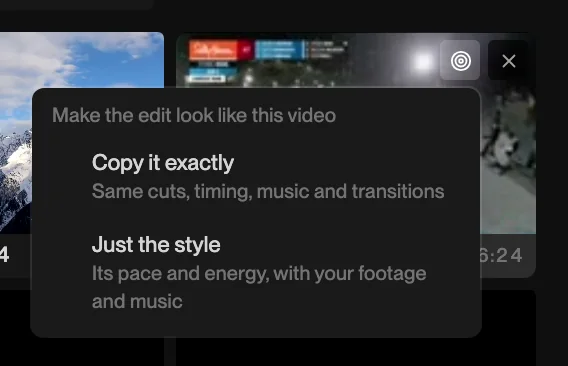
When you mark a video as a reference you choose, in the same click, how it is used:
- Copy it exactly. Same cuts, same timing, same music and transitions, with your footage in the slots. This is for recreating a format: a trend, a house style, a client’s previous video.
- Just the style. Its pace and its energy, with your footage and your music. This is for “I want mine to feel like that” when your song and your length are already decided.
There are three places to do it. An empty project asks, at the bottom of the chat: “Have a video you want this to look like?” Choose how to use it and pick the file, and the video arrives in the project already marked. Any video already in the media panel has the same two choices in its tile menu. And a link works: paste a YouTube, TikTok, Vimeo or X URL into the chat and the editor fetches it, tells you what it fetched and from where, and studies that. You judge the rights to what you point it at.
What the study measures
Matching a reference is two steps in one turn: study, then build. The study is slow, a few minutes for a reel, because it looks at everything rather than sampling it:
- Every shot. The reference’s cuts are detected, so the plan knows the clip count and the length of each clip, not an average.
- The frame. Its aspect ratio and how the subject sits in it. If the reference is 9:16 and your project is 16:9, the frame is set to the reference’s and the reply says so.
- The music. The reference’s track is analysed for its grid, and so is the track your cut will follow, so the cuts land on your beats in the reference’s rhythm.
- The grade. Read off the reference’s own frames and reported as numbers the colour tools take, not as “warm and moody”.
- Your footage. Every source is looked at, a still every few seconds, so the plan can say which half-second of which clip fills each slot.
The study ends in a written plan, and the build follows the plan: same clip count, same lengths, same grid, same geometry. That separation matters. An editor that spends minutes studying and then starts cutting is cutting with the study falling out of its memory; writing it down first is what keeps the last clip as faithful as the first.
What it will not invent
A reference usually contains things your footage does not. The honest answer to those is to say so, and that is what the plan does:
- A branded graphic, a logo sting or a caption in someone else’s font is reported as “an overlay is here”, not recreated.
- A slot your footage cannot cover (the reference has a drone shot, you do not) is listed as uncovered rather than filled with something plausible.
- An effect the study cannot measure is carried as a requirement you asked for, so it is not quietly dropped.
You will get those as a list in the reply. Decide what to do about each: shoot the missing shot, accept a different one, or drop the slot.
How to ask
The request itself can be short, because the reference is doing the describing. What helps:
- Choose the mode deliberately. “Copy it exactly” with your own song will fight itself; the reference’s cuts belong to its music. If the song is yours, choose “just the style”.
- Say what your footage is. “Twelve clips from Saturday’s game, the good stuff is in the second half” tells the study where to look.
- Name the exceptions. “Same everything but 20 seconds, not 40” or “its pace, but keep my colours”.
- Correct with focus, not from scratch. After the first build, say what is still off: “the pace is right, the grade is too warm, the third cut is late.” The study is re-run only on what you named.
Use the reel I pasted as the reference, just the style. Cut my twelve clips to the song I uploaded, about 25 seconds, and keep my footage’s colours.
Why this beats describing it
The failures that led to this feature were edits that came back “way too far off”: the wrong frame, half the cut count, a slower pace, a different musical grid, all at once. Every one of those is a number. A description of the reference loses them; measuring the reference keeps them. The things that are not numbers, the taste in which shot goes where, are still the editor’s job, and yours to correct.
See what a study would see
Open the snowboard edit. Count the clips on the timeline, read their lengths, scrub the drop at 0:11 and watch where the cuts sit against the beat. Those are exactly the facts a reference study writes down about a video before it builds yours. Then start a project of your own, mark a video as the reference, and ask for the same.