
How to make a TikTok from your camera roll in one prompt
Over-pick, under-specify. Name the kind, the length, the frame and the feel; answer one question; trim with your fingers; save to Photos. The habits behind a first cut that lands.
Most TikToks start as three clips in a camera roll and a vague idea. On the Narrative iPhone app that is the whole input: pick the clips, type what you want, answer one question, and a cut with captions comes back on a timeline you can fix with your fingers before you save it to Photos. This is the fastest path from the roll to a posted video, and the habits that make the first cut land.
Start from the clips, not the idea
Open the app, press the plus and pick from Photos. Pick everything that might belong, not just the three you are sure of; the editor reads all of it and leaves out what does not fit, which is faster than you going back for a clip you skipped. Photos work alongside video: a still becomes a held frame in the cut. The clips stay in your library. The app sends the sound of each clip for a transcript (that is how it knows where you said what) and, when an export needs the server, only the stretches the edit uses.
Most first projects on the phone are small: the typical pick is three items, and a third of them are a single clip. One clip is enough for a talking-to-camera post; the editor cuts the dead air out of it and captions it. Three to six clips is where a montage starts to work.
The prompt
Say what the video is for and how it should feel. You do not need to describe the edit; you need to describe the result. Four things matter, in this order:
- The kind of video. “A TikTok of me talking about the new menu.” “A hype edit of Saturday’s game.” “A travel montage of the trip.” The kind sets a whole set of defaults: how tight to cut, whether captions go on and what they look like, whether the sound stays.
- The length. “Under 15 seconds.” “About 30 seconds.” Short posts dominate on the phone: two thirds of what people export runs under 15 seconds, and most of the rest under 30.
- The frame. 9:16 for TikTok and Reels. Say it, or set it from the aspect menu at the top of the editor before you send; the cut is framed to it from the start rather than cropped later.
- The feel. “Fast and punchy.” “Let the shots breathe.” “Start slow and build.” If you leave this out, it is usually the one thing the app asks you.
A 20-second TikTok, 9:16, from these clips. Me talking at the start, then the shots of the food while I talk. Fast, captions on.
If you want music, add a track you have the rights to use and say so (“cut it to the song I added”); the cut then lands on its beats. For a talking post the clip’s own sound is the point, and the editor keeps it and cuts out the gaps.
It asks, then it builds
About one request in four ends with a question rather than an edit, and most of the time it is one question: how the edit should feel, which aspect ratio, how long. It pops up as a sheet with the choices as buttons; tap one and the build starts. Anything you already said in the prompt is never asked again, so a full prompt skips the sheet. The turn usually takes about a minute, and the chat shows the steps as it works.
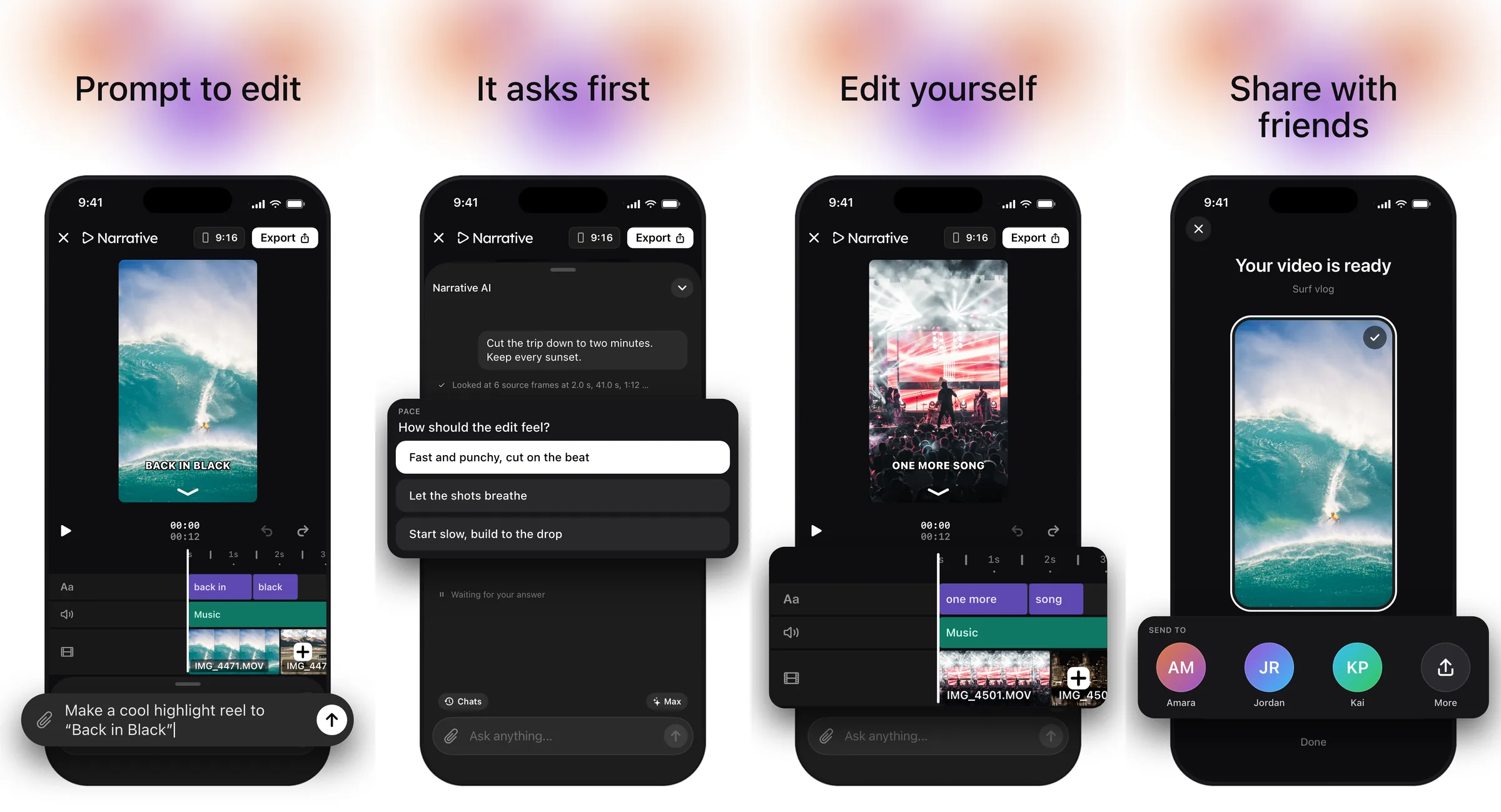
What a talking-to-camera post gets
When you are the one on screen, the editor cuts the gaps tight (several clips, the kept stretches butting up, almost no dead air between words) and puts captions on in the creator style: one or two lowercase words at a time, under the chin, in a clean sans. No badges, no labels, no watermark; a first cut carries nothing you did not ask for. If you named a product and there is a shot of it in your picks, the shot is cut in on the word that names it.
A montage is the other common shape: the music decides the cut, and the editor asks about pace and how flashy to go unless you said.
Fix it with your fingers, or with a sentence
The timeline under the video is a real one. Press and hold a clip to move or reorder it, drag an end to trim, cut at the playhead, undo. Touching the strip pauses playback so you are always working on a still frame. Tap a clip and the keyboard dock swaps the chat for a row of tools; the back chevron brings “Ask anything” back. Every change you make saves as a version, and the editor’s next turn starts from what you did, so a trim you made by hand is not undone by “make the captions bigger”.
For anything larger than a trim, say it: “cut the second clip,” “start on the shot of the plate,” “the captions are too low.” Name the moment and the change; the hand-editing post covers where the line between the two sits.
Export and post
Press Export. For most short edits the phone renders every frame itself, with a ring around the poster showing progress; longer or heavier edits go to the server, and the app says what it is uploading while that happens. When it is done you get Save to Photos and Share. Save to Photos, then post from TikTok as you normally would, so the upload goes through TikTok’s own compressor with no extra step in between.
Three habits
- Over-pick, under-specify. Give it more clips than you need and fewer instructions than you think; the kind, the length, the frame and the feel are enough for a first cut.
- Answer the question with the post in mind. “Fast and punchy” and “let the shots breathe” are different videos from the same clips. Think about where it is going.
- Fix the last ten percent yourself. A trim is quicker by hand than by sentence. Save the sentences for changes that touch several places at once.
Get the app
Narrative is free to download on the App Store for iPhone, iOS 18 or later. Your first edit starts a three-day free trial. On a computer, the web editor does the same work with a mouse.