
How to put text behind a person in a video (and cut anything out of a shot)
The effect is a cutout: the subject, tracked through the shot, painted over the title. How to ask for it, what the tracker needs, and the snowboard edit that does it at 0:10.
A title that sits behind the person in the shot reads as part of the footage rather than a sticker on top of it. It is one of the most copied effects in short-form video, and the reason it looks expensive is that it used to be: someone had to mask the subject frame by frame. Now the mask is a model’s job, and the effect is one sentence.
This is how the effect is made in Narrative, what else the same cutout gives you (a frozen pop-out, a logo with its background gone, one player picked out of a team), how to ask for it, and where it does not work. The snowboard edit does it at 0:10, on a public timeline you can open.
What the effect actually is
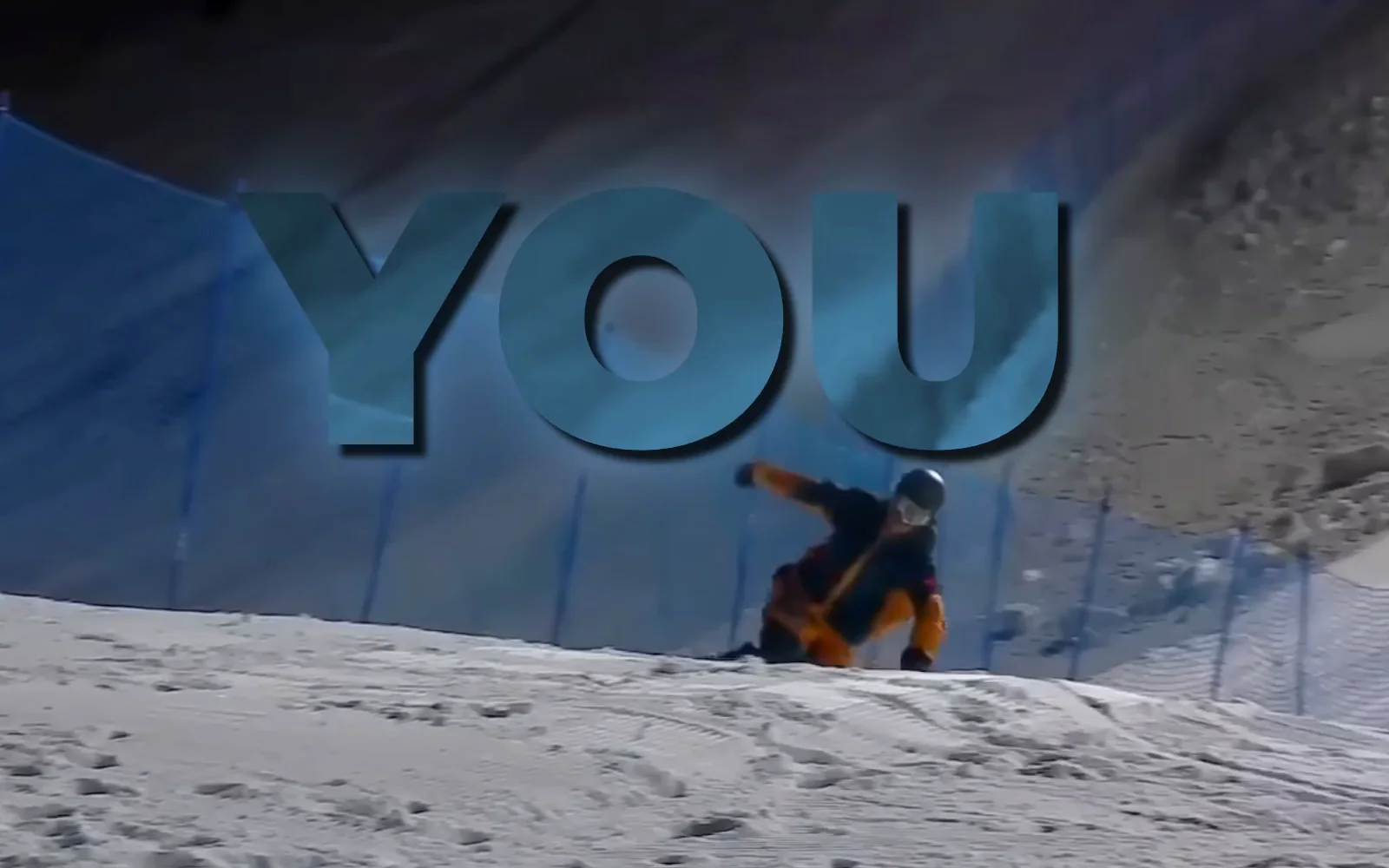
Nothing is placed “behind” anything. The title is drawn normally, over the video. Then a second copy of the video, in sync with the first and masked to the shape of the subject, is painted on top of the title. Where the subject is, you see footage; everywhere else, the title shows through. The subject appears to be in front because a cutout of it is.
So the whole job is the mask: a video, the length of the shot, white where the subject is and black where it is not, that follows the subject as it moves. Everything else is composition.
Name it, or point at it
Narrative makes the mask two ways. The first is by name. Ask for “the title behind the skier” and the editor segments the shot with a text prompt: the model finds every skier in the frame and tracks them through the range. One subject per request, by its plain noun: “skier”, “person”, “bottle”. When there are several, say which (“the woman on the left”), and the editor passes that on.
The second is by pointing. When the subject is one of several of the same thing (the keeper, not every player), when no word names it (that prop, that part of the machine), or when the name picked the wrong one, the editor looks at a frame of the shot and clicks the object it means: a few positive clicks on its solid parts, a negative click on the neighbour the mask should leave out. A tracker then follows that one object forward and backward from the clicked frame. Either way the editor gets back a check picture, the frame with the mask tinted and the clicks drawn on, and looks at it before building anything. If the mask took the wrong thing, or only part of it, it moves the clicks and tries again rather than shipping a bad cutout.
The mask’s edge is smoothed by default. A model mask is a staircase of pixels; the editor rebuilds it as a smooth contour before use, so the cutout’s silhouette is clean without the picture inside it being blurred. Blurring a cutout to hide a rough edge is the giveaway of a bad one, and it is not done here.
The same cutout, three other ways
- A frozen pop-out. “Freeze on me and pop me out of the frame.” One still of the subject is cut out and scaled up over a frozen, blurred background. A still cutout takes a few seconds.
- Background removal. “Remove the background of the logo I uploaded”, “put a cutout of the bottle in the corner.” The still with the object opaque and everything else transparent, saved into the project as a picture the editor can place anywhere.
- The subject stays, the rest changes. Blur, darken or recolour everything except the person: the mask is the same; the editor inverts it. (It segments the subject in front of a background, never the background itself; “grass and trees” finds nothing, “person” does.)
Lettering that is already in the footage (a burned-in title, a sign) is found by asking for “the title” or “the words”.
How long it takes
Tracking is real work. By name, the model tracks about five frames a second, so a five-second shot is under a minute and a thirty-second one is about three. By click, the tracker is faster, at roughly real time. Footage on your phone adds its upload first. The editor therefore masks only the part of the shot the effect uses, not the whole clip, and tells you the range it covered in the edit’s timecodes (“0:12 to 0:15, the title sits behind you”). Ask for the effect after the cut is settled: re-trimming a shot moves the footage under the mask, and the editor will redo it.
Where it does not work
- A graphic that merely sits next to the person needs no cutout; there is nothing to go behind.
- A subject that leaves the frame every few frames gives a mask that flickers. A lower third is the better call, and the editor will say so.
- Fast motion with a slow shutter: the edge of the mask lags the motion blur by a pixel or two. It is not fought frame by frame; a slightly smaller title or a softer canvas hides it.
- Thin, small or blurry targets (a stick, a ball far away) are the model’s weak spot. The editor probes a couple of seconds first and reads the coverage before committing to a long run.
How to ask
- “Put the title behind me on the first run.”
- “Make the name slide in behind the skier at 0:12.”
- “Freeze on the celebration and pop him out of the frame.”
- “Remove the background of the sponsor logo and put it bottom right.”
- “Blur everything except the speaker for the first three seconds.”
- “The keeper, not every player.”
At the first jump, the word “SEND” huge, behind the rider, tracked through the landing. Keep the rest of the frame clean.
See it on a real timeline
Open the snowboard edit and scrub between 0:09 and 0:12. The lyric is on the graphics row; the rider is in front of it the whole way. On the “COLD” hit he is frozen and slides in as a cutout, and the snowboard carries its own mask, so the board and the body can move apart. Opening it needs no account; your first change starts a three-day free trial, and the web editor runs on a computer; on a phone, the iPhone app is the way in.