
How to reframe a 16:9 video to 9:16 without losing anyone in the shot
A centre crop loses one of the two people. The fix is to stack them or follow whoever is talking. Here is a 27-second clip that does both, and how to ask for it.
Most footage is shot wide and most of it is watched tall. The problem with turning one into the other is not the maths; it is that a 16:9 frame with two people in it does not fit a 9:16 frame at all. Crop the centre and you keep the gap between them.
There are two ways out. Stack the two people, one above the other, so both stay in the frame. Or follow whoever is talking and cut between them. The clip below does both, and you can open it on its timeline without an account to see how.
What the 16:9 footage was
A 36-second stretch of a longer video: two people on a couch in a trailer, shot on one wide 1080p camera. Nothing about the framing was designed for vertical. The camera is far enough back that a centre crop would show a wall and half of each of them.
What the 9:16 clip is
Twenty-seven seconds, vertical, captioned. The frame switches between two treatments. When both people are part of the moment, the clip is split-screen: one on top, one below, each cropped tight to their own face. When one of them is carrying it, the frame is a full-screen crop on the active speaker. Pop captions sit in the middle, between the two, so they never cover a face.
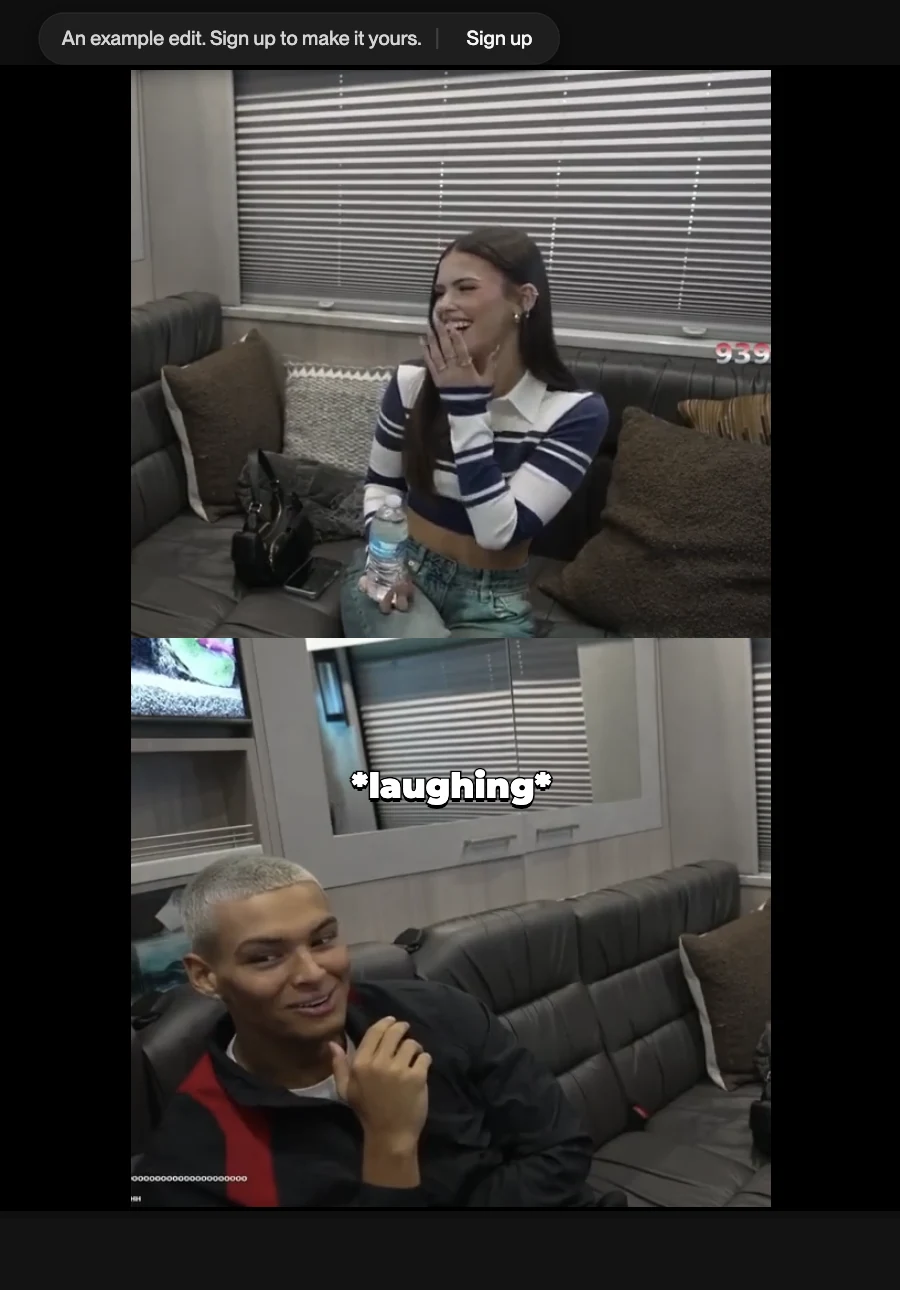
The eight cuts in it are named after the beats of the conversation on the timeline: the food question, the confusion, the reveal, the first laugh, the closing laugh. Sound effects sit on their own track under two of them (a Vine boom and a Wii menu chime, if you know the genre). The original dialogue is kept as its own audio file, so the crop never touches the sound.
How to ask for it
In Narrative the reframe is part of the request, not a separate export step. Drop the wide footage in and describe the vertical you want. The parts that matter:
- Say 9:16. Or “vertical, for Reels.” That decides the frame.
- Say what to do with two people. “Stack them when they’re both in it, follow the speaker when one is.” If you always want both visible, say “always stacked.” If you only ever want the speaker, say that.
- Say where captions go. “Captions in the middle, never over a face” is a request the editor can act on. So is “captions under the top person.”
- Say the length. The 36 seconds above became 27 because the brief asked for the best of it, not all of it.
Cut this to a vertical clip for Reels, under 30 seconds. Stack the two of them when they’re both in it, follow the speaker when one is. Pop captions in the middle, a boom on the reveal.
You will get a first cut on a timeline, not a file. If the crop is sitting too high on someone, or the switch to full-screen happens on the wrong line, say so: “keep the top crop lower on her” or “stay split-screen through the confusion.” Each change is a version you can step back from.
When a crop is the wrong answer
Some footage should not be reframed. A wide shot whose point is the width (a stage, a landscape, a room full of people) loses the point in any vertical crop. For those, the honest vertical is the wide shot letterboxed, with the space above and below doing the work. Reframing is for footage where the subject is people, and the people are what you need to keep.
Check it on the real thing
Open the clip. Scrub to a split-screen section and then to a full-screen one and watch the switch. Then ask it for a change, “always stacked” is a good first one, and see what moves on the timeline. That is the whole workflow; opening the clip needs no account, your first change starts a three-day free trial, and the web editor runs on a computer; on a phone, the iPhone app is the way in.